Page access and indexability
We follow the links to a priority page and check its response, indexing instructions and preferred URL. A strong service description cannot help someone find a page that still points search engines to an old address.

Search optimisation · On-page
Someone finds your page. Can they tell what you offer, whether it fits and how to buy? MayaWeb helps you answer those questions in the search result and on the page itself.
From a search to a useful answer
Help people recognise the right page in search and find their answer when they land.
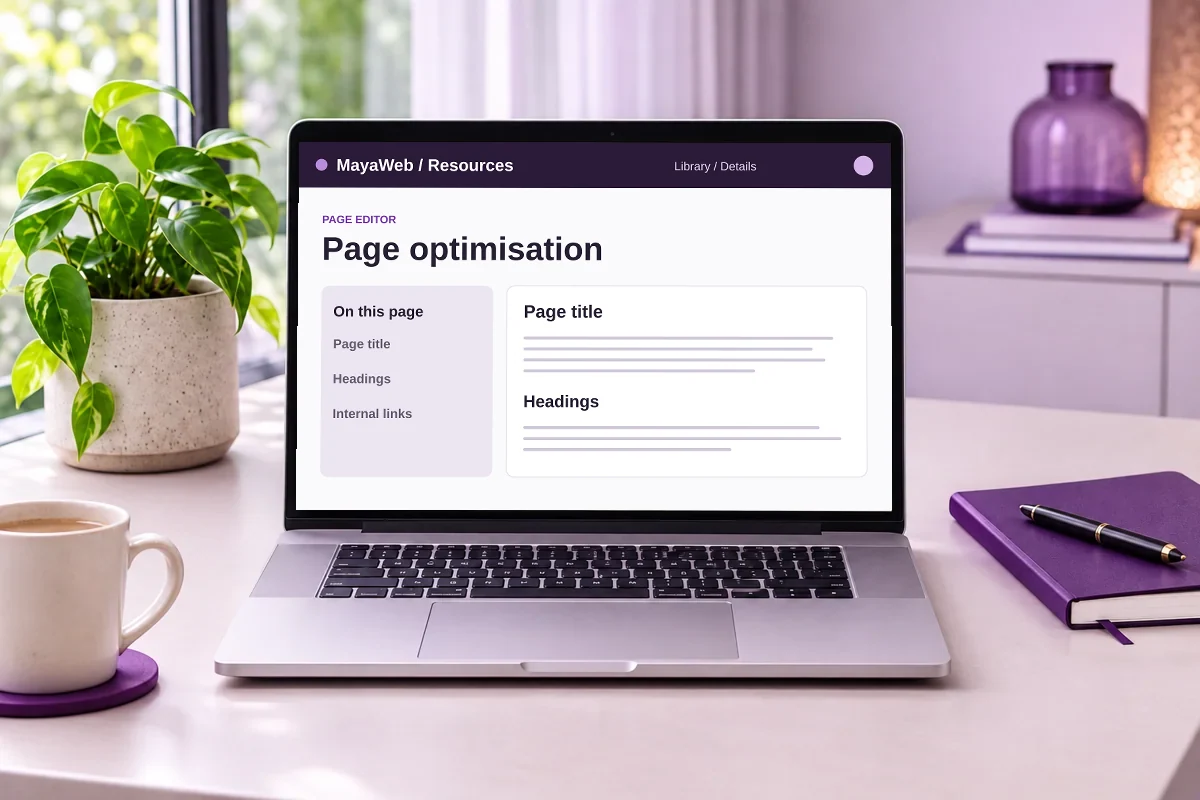
On-page SEO means improving the content, structure and HTML of an individual web page so search engines can understand its subject and visitors can use it. The page title names what you offer. The headings organise the details. Internal links help someone reach the next useful page.
Consider a café owner searching for espresso machine repair in Chandigarh. A general equipment page leaves them guessing. A repair page that lists the machines you service, the areas you visit and how to book answers the question behind that search.
The same principle applies to a course, a product or a guide. Start with what the visitor needs to decide, then put that information where they would expect to find it.
Explore our on-page SEO servicesA useful page matches the reason someone searched and helps them decide what to do next. Improve the title, content, links and enquiry journey together so each change supports the same purpose.
Discuss my pagesReview the terms buyers use and the pages that already appear. Decide whether a service, product, comparison or educational page fits the purpose.
Write useful titles and headings around the actual offer. Arrange information so visitors can scan the answer and understand which questions the page covers.
Identify content gaps and outdated statements. Add useful details your business can support, such as specifications, service boundaries, process or answers to common objections.
Point people to related guides, categories and service pages with descriptive link text. Test whether the main action is easy to reach from desktop and mobile.
Review the edited page against relevant searches and actions. Use available performance data to decide whether to improve the content, links or the enquiry journey.
The foundation
A page called “Our Services” may make sense inside your menu. Seen on its own in search, it gives a potential customer little reason to choose it. An on-page SEO service reviews the searches that bring people to that page, rewrites unclear titles and copy, and makes the next step easier to find.
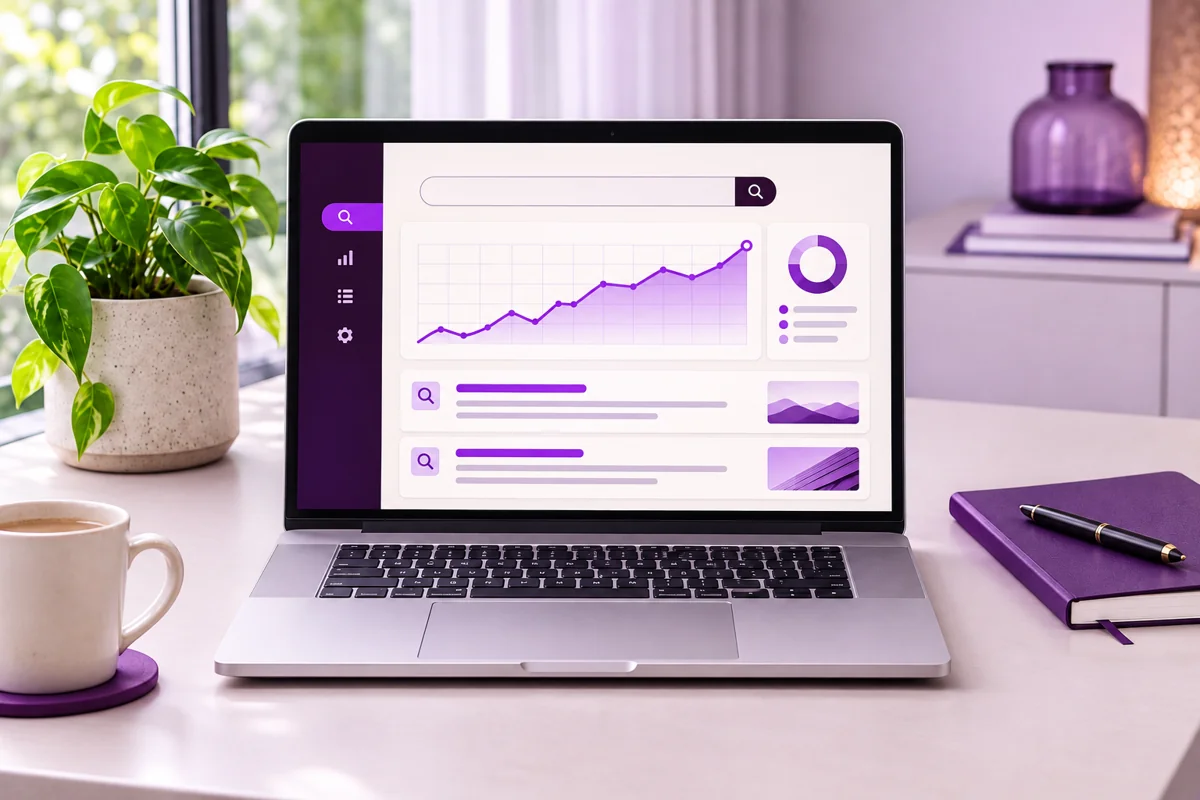
Backlinks and mentions are part of off-page SEO. Here, the work is on pages you control: the words a visitor reads, how those words are organised, and where the links lead. The example below shows what that can mean for a local service business.
Search title
“Welcome to our website. We offer a wide range of quality solutions. Get in touch for more information.”
A café owner still has to ask: do you repair my machine, and can you come to my café?
Search title
“Tell us your machine model, the fault and your café’s location so we can check whether an on-site repair is available.”
The title identifies the service and area. The first sentence helps the right customer request a visit.
02 / Deliverables
We start with the pages tied to a business decision. Open a workstream to see what we check and what your team receives.
We compare the results for the terms your buyers use. A search for “espresso machine repair” needs a service page; “why is my espresso machine leaking?” may need a guide. We assign one primary task to each URL and flag pages competing for the same search.
What you getA query-to-page map with a keep, refresh, combine or create decision.
A title should say what is on offer before it runs out of room. We draft a distinct title and meta description, check that the H1 describes the offer and arrange subheadings around the questions a reader actually asks.
What you getA side-by-side edit sheet ready for approval.
We read your page beside the results a customer sees. We identify unanswered questions, thin or repeated passages and claims that need proof. Details from your team, an original photo or a worked example can be more useful than another paragraph.
What you getA content brief that singles out what to add, cut, verify or move.
We trace how someone reaches the page and where they can go next. A useful guide should lead to the relevant service, and a category should lead to products buyers can order. We flag orphan pages and review redirects before suggesting a URL change.
What you getA list of source pages, destinations and descriptive link text.
We inspect the actual page on a narrow screen. Do important details sit inside an image? Does a large banner delay the product photo? Can a visitor reach the enquiry button? We review image sizing, descriptive alt text, video captions and layout stability.
What you getSpecific asset, copy or layout fixes, with developer tasks identified.
We check that the intended URL is accessible, indexable and points to the right canonical page. Where a format fits, we match structured data to the visible content, such as a product’s price and availability, and validate the output.
What you getPage-level checks and a separate handover for issues shared by a whole template.
We turn questions from sales or support into short, attributable answers. A comparison table, a clear definition or a dated source helps readers judge the answer. We don’t promise that a search engine or AI assistant will quote it.
What you getA question map, suggested answer formats and facts for your team to confirm.
With access, we review Search Console queries beside landing-page activity in analytics. For lead generation we distinguish a submitted form from a qualified enquiry where CRM data is available; for stores we check whether product views lead to orders.
What you getA baseline, release log and the next review question for each priority URL.
We follow the links to a priority page and check its response, indexing instructions and preferred URL. A strong service description cannot help someone find a page that still points search engines to an old address.
We turn questions from sales and support into answers a visitor can act on. A course page might need entry requirements; a spare-part page might need a list of compatible models.
We organise content around the decisions people make. A visitor comparing training courses should see the options together, then be able to open a syllabus without guessing which menu label to choose.
A title should identify this page even when it is seen outside your website. We write distinct titles and descriptions for priority URLs, so a repair booking page and a maintenance guide describe different things.
We check which version of a page your menus, articles and breadcrumbs point to. If two URLs cover the same offer, we identify what belongs on each or recommend one useful destination.
Someone asking how to measure a window needs instructions. Someone looking for a made-to-measure quote needs a service page. We match each search to the page that can satisfy it.
We try the page on a phone: read a specification, compare options, call, book or start checkout. We record where a hidden link, an awkward table or an overlapping button gets in the way.
Site-search terms and customer questions can reveal unfamiliar labels. If customers search for “fees” but the menu says “investment”, we test wording that helps them reach the information they meant to find.
We compare visible facts with any structured data on the page. That might mean checking a product price, a business address or a breadcrumb trail after a template change.
Working with a product catalogue? Explore eCommerce SEO services →
03 / When to act
Start with the symptom you can see. It gives us a question to investigate before choosing a fix.
Working with MayaWeb
From the first edit to the next review, you can see who owns the work, why a page was chosen and how progress will be judged.
A missing product detail belongs with a writer or merchandiser; a title repeated across a thousand pages may need a developer. We identify the owner of each change before the work begins.
A crawl can find the same generic title across a whole section. We check a sample by hand to see whether one template change will solve the problem, saving your team from editing every URL separately.
We agree on what a useful visit means for each page: a booked appointment, an accepted enquiry or a completed order. Where tracking is available, those outcomes sit alongside clicks and impressions.
We record which pages changed and when. If a promotion, a stock shortage or a tracking update overlaps with the release, we mark it in the report so you can judge the result in context.
A course that opens for enrolment next month has a different deadline from an evergreen guide. We use demand, availability and your publishing calendar to decide which pages to tackle first.
For ongoing work, we keep a page-by-page change log with the next review and owner. A new writer or developer can see what was tested, what changed and what still needs attention.
Plans & pricing
A handful of service pages and a catalogue that shares one template need different estimates. All four packages are quoted in USD. We confirm the page count, deliverables, fee and payment schedule before work starts.
Page review. For a team that can publish its own edits.
QUOTED TO SCOPE
Request a Quote
Price and billing confirmed in your proposal (USD)
Page refresh. For service or product pages ready for editing.
QUOTED TO SCOPE
Request a Quote
Price and billing confirmed in your proposal (USD)
Ongoing optimisation. For teams updating several offers or categories.
QUOTED TO SCOPE
Request a Quote
Price and billing confirmed in your proposal (USD)
Multi-team project. For a large catalogue, migration or agency delivery.
TAILORED SCOPE
Request a Quote
Price and billing confirmed in your proposal (USD)
Need a budget estimate? Send a few representative URLs and tell us whether your team can publish the edits. Writing new pages, template development and analytics setup are itemised when required.
05 / How we work
Follow one page from its first review to a checked release. Open a step to see the work and the deliverable your team receives.
We ask which service, product or collection needs better enquiries or sales. A fully booked service and an available one can draw the same search but call for different priorities.
A shortlist of URLs, their audiences and the action each page should invite.
We note current titles, search queries, clicks and any tracked enquiries or purchases. We mark recent promotions and site changes so later comparisons have context.
A dated baseline with any gaps in tracking identified.
We compare what appears in search with the job of each candidate page. If a how-to guide and a booking page compete, we decide what each should answer and how they should link.
A query-to-URL map and decisions on overlaps or missing pages.
We follow menu links, breadcrumbs and links inside the text. For a store, we also test whether a filter or variant leads away from the product you want found.
An annotated list of link, indexability and template issues.
We try the action your customer came for: check compatibility, choose a size, call the right branch or request a visit. We note which missing detail or awkward control gets in the way.
A short mobile task log with examples your team can reproduce.
A writer can change a heading; updating stock information across a template may need a developer. We separate those tasks and show the current wording beside proposed edits for approval.
A prioritised edit sheet showing the owner and acceptance check for each change.
We agree a representative page, apply or hand over its approved edits and check the published title, copy, links and next step before repeating the work elsewhere.
A checked pilot and a list of changes suitable for a wider rollout.
We revisit the live pages and compare relevant searches and actions once there is enough data. We keep a tracking fault or stock change separate from a content result.
A release record, a review of what changed and the next pages to address.
06 / Measurement
Rankings tell only part of the story. To judge an edit, we follow the same URL from search visibility to the action it was built for.
| Question | Evidence to check | How it guides the next edit |
|---|---|---|
| Are the right searches finding it? | Search Console queries, impressions and clicks by landing page. | If a repair page attracts mainly DIY questions, link the guide and clarify the service offer. |
| Can visitors take the next step? | Mobile checks, analytics events, form completions or completed purchases. | If visitors reach the booking button but cannot choose a date, test the booking flow before rewriting the page. |
| Was the enquiry useful? | CRM outcomes or order records where available, checked against the release date. | If most requests come from outside the service area, make the area explicit earlier. |
We compare similar periods and note promotions, stock changes and tracking gaps. If lead quality or revenue cannot be traced to a page, we label the gap.
07 / Why MayaWeb
Your audit should tell you which page to change first, what the customer needs there and how the person making the edit will know it worked.
A service page, a guide and a sold-out product do different jobs. Comparing examples helps us tell whether one URL needs an edit or every page using its template needs attention.
A booking page for next month’s intake may be more urgent than a popular article. We ask what you can deliver, which leads fit and what is about to change before deciding what comes first.
Each priority includes a URL, what happens now and what should happen after the change. Your team can follow the same route and check the result without interpreting an audit score.
We distinguish an edit your writer can make from a shared template or plugin change. Your subject specialist approves the facts; the person with publishing access knows exactly what to release.
A wholesale quote request and a completed retail order are different outcomes. We agree what counts as a suitable lead and use order or sales records where available to assess the result.
The proposal distinguishes the audit, copy revisions, development and post-release checks. It names who handles each piece, so neither team assumes a recommendation has already gone live.
08 / Case studies
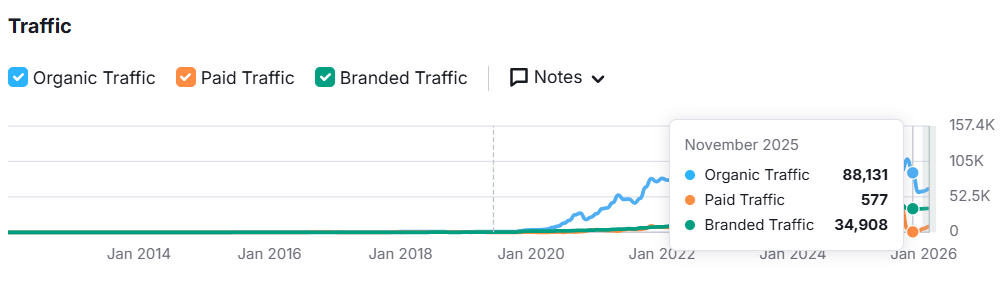
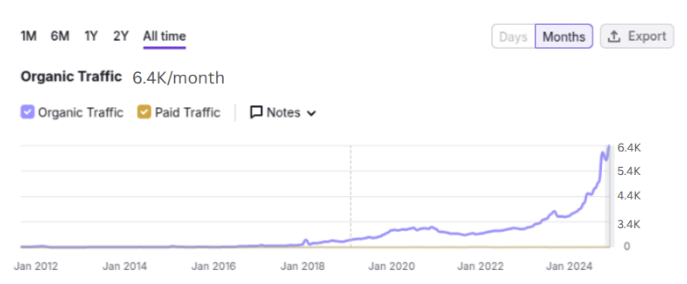
These figures come from MayaWeb’s broader SEO case studies. They put the work in context; they do not isolate the effect of on-page edits.

Reported as per the Henry Harvin case study.
View Henry Harvin traffic evidence
Reported as per the SAL Removals case study.
View SAL Removals traffic evidenceIN OUR CLIENTS' WORDS

“MayaWeb exceeded all my expectations! Their professional team delivered our website on time, and the quality was outstanding.”

“MayaWeb is a truly remarkable digital marketing agency. They exceeded all my expectations with their professional team, on-time delivery, and outstanding quality.”

“They crafted a stunning website that showcases our brand, then targeted dream customers with laser-sharp Facebook and Google Ads.”
The agreed scope names the URLs, checks and edits. A review can stop at a prioritised list; an implementation project can include approved content changes, internal links, CMS publishing and post-release checks.
On-page work improves the meaning and usefulness of individual pages. Technical SEO looks at shared systems such as crawling, rendering and templates. Off-page SEO concerns signals outside the website, such as editorial links and mentions.
Yes. We record the queries and sections already attracting useful visits, preserve what works, and target the gap. We review redirects and incoming links before suggesting that any established URL moves.
We quote in USD after reviewing the URL count, template variety, amount of rewriting, implementation access and reporting needs. Your proposal identifies what is included, who publishes and whether the fee is for a project or recurring work.
We can check the published edits immediately. Search performance takes longer: a page has to be revisited and enough comparable visits or enquiries have to accumulate. We agree a review window around your traffic and sales cycle.
We can prepare briefs and CMS-ready copy for your team. For shared templates, staged releases or work delivered through a partner agency, we agree access, ownership, approval steps and publishing responsibilities first.
Where available, Google Search Console shows queries and clicks; analytics records landing-page actions, and CRM or order records help assess lead quality and sales. A crawl and manual browser checks help verify what actually shipped.
If AI-assisted drafting is part of your brief, we agree its role in advance. Your product facts, examples and claims still need a human reviewer. We don’t guarantee inclusion in AI answers or a particular search position.
Both are possible. A stable service page may need one focused refresh. A changing catalogue, a series of launches or a large editorial backlog can justify a recurring review.
No. Send a public URL, the customer you want to reach and the action you want them to take. We can discuss scope before requesting analytics or publishing access.
From search to sale
A home barista buying one water filter and a café group ordering replacements can start with the same search. Give each buyer a useful answer and a next step that fits the order.
Discuss your on-page SEO priorities“espresso machine water filters”
See which filters fit which machine models.
Check pack size, stock and delivery before ordering.
Specify the machines, quantities and delivery schedule.
A search for “espresso machine filters” belongs on a range or comparison page. A customer who enters an exact filter code should reach the matching part.
Show compatible models, cartridge life and what comes in the box beside the buy button. A customer should not have to leave the page to find out whether a part fits.
Show stock for the selected pack, delivery charges and dispatch timing where the buyer chooses it. For a service page, make the area covered and booking conditions just as clear.
A café group ordering filters for twelve machines needs a quantity quote and a delivery schedule. A separate trade enquiry lets them share those details without going through retail checkout.
Match retail purchases to order records and suitable trade enquiries to the sales team’s follow-up. Note promotions, returns and tracking gaps before crediting an improvement to SEO.