Bookings at the right branch
Start with the location that receives the wrong calls. Compare its listing, opening hours, landing page and booking destination before changing every branch.

MayaWeb / Search diagnostics
Find out why a valuable page lost traffic, why the wrong URL appears in search, or why visits stopped turning into enquiries. MayaWeb’s SEO audit gives you the evidence, the person best placed to fix each issue and a way to check the result.
The starting point
An SEO audit investigates why the pages that matter to your business are hard to find or fail to produce the enquiries or orders you expect. We start with a question your team needs to answer, check representative pages and document what the evidence supports.
For example, a fall in reported enquiries after a redesign could mean fewer visitors, a broken booking link or a tracking event that stopped firing. Those problems can look alike on a dashboard. They need different fixes.
A useful review connects a finding to the page, its business impact and the evidence behind it. Get a prioritised handover your team can discuss with developers and content owners.
Discuss your auditIdentify the services, products and customer actions the audit should focus on. Agree representative templates and what data or access is available for review.
Review which pages search engines can reach and index. Sample template behaviours, internal links, sitemaps and canonical signals to find issues that affect priority URLs.
Examine page relevance, mobile journeys and measured performance. Separate issues that repeat across templates from individual pages that need a closer look.
Give each priority issue a clear example, affected group and suggested owner. Set out the evidence and a practical acceptance check for the work.
Use the original finding as the basis for retesting. Record whether the change addressed it and which remaining priorities should be checked in the next review.
How we work
The audit is useful only if someone can act on it. Each stage ends with something your team can review, approve or put into its work queue.
Tell us what changed, when it happened and which pages matter. A drop after a redesign calls for a different investigation from a site receiving plenty of visits but few suitable enquiries. We agree the sample, access and exclusions before the review begins.
Deliverable: Written brief and access checklistWe review a sample of live URLs alongside the available search and analytics data. We keep dates, page types and test conditions with the observations. When account access is unavailable, we identify which questions the public site alone cannot answer.
Deliverable: Baseline and reproducible examplesWe group repeated warnings by cause. A navigation fix affecting every location page may come ahead of rewriting one title. Each material finding has a proposed owner, a reason for its priority and a test that would show whether the change worked.
Deliverable: Prioritised backlog with ownersYour team sees the examples and can challenge the assumptions before committing development time. If release checks are included, we repeat the original test on the changed pages. We record resolved issues separately from search or sales trends that need longer observation.
Deliverable: Handover and agreed release checksYour audit brief
Tell us what a good enquiry or sale looks like. We use that answer to choose which pages to sample, which accounts to request and who should be involved in the handover.
Start with the location that receives the wrong calls. Compare its listing, opening hours, landing page and booking destination before changing every branch.
Pick a category with demand and available stock. Follow a shopper from the search result through variant selection, delivery information and checkout.
Choose a service that fits your pipeline. Check whether the page explains eligibility, specification and lead time, and whether the enquiry reaches the person who can answer it.
01 / Audit coverage
A traffic drop, a store redesign and a branch receiving the wrong calls need different checks. Explore ten types of SEO audit and see what each one puts in your hands.

A collection opens in a browser, but its XML sitemap still lists the retired address. We compare the sitemap, response codes, indexing instructions and selected canonical for a sample of URLs. We distinguish an intentional exclusion from a crawl error.
If a title promises installation but the page only lists equipment, changing the keyword count will not help the buyer. We read the title, search description, headings and visible offer together, then follow the route to enquire.
An old buying guide can still earn useful visits even when the products it mentions have changed. We compare searches, current stock or services, accuracy and overlap with newer advice before suggesting what to do with the guide.
A trade association might still link to your old service address. We inspect relevant referring pages, their context and where the links land. A third-party risk score alone is not a reason to remove a link.
We follow a listing through to the branch page and try the call, directions or booking link. A shared switchboard, conflicting opening hours or a booking link for another branch can each send an otherwise suitable enquiry astray.
We sample categories, filters, variants and out-of-stock products. A search for a range should lead to a useful selection; a search for one model should land on the right product with an available option and a working purchase route.
For agreed searches, we compare the kinds of pages people see. A sizing guide, a directory or a local supplier can compete with your service page. We look for a question your business is qualified to answer, rather than copying another site.
We select a variant, dismiss a banner or try to book on a phone. We check whether content loads late, the layout moves or a sticky element covers a control. Then we repeat the task on another representative page.
With access, we check the Manual Actions report in Search Console. If there is a notice, its scope guides the investigation. Without one, we compare the loss by date and page type with releases, tracking changes and seasonal demand.
Starting at the homepage, we try to reach a priority service or collection through the menus and contextual links. This can reveal an orphan page or a category buried several levels deeper than an equivalent offer.
Business benefits
The immediate benefit is a better decision: which page to change, what to leave alone and how to judge the result. Here are nine decisions an audit can support.
If two service pages answer the same search, decide which should lead and what useful job the other page can do.
See which searches already bring impressions to a collection, then check whether the page offers what those shoppers expect.
Try booking on a phone. A calendar that sits beneath a cookie banner needs a layout fix before the page needs more copy.
If recorded leads fall after a form update, compare successful submissions with analytics before changing the campaign.
Follow a product visit through to checkout. A delivery restriction first revealed in the basket calls for clearer product information.
Separate this week’s broken links from template changes that need design and development time. Both get a place in the plan.
Flag contradictions in opening hours, warranty terms or prices before a customer has to decide which page to believe.
If every competing page lists prices but none explains compatibility, a well-tested compatibility guide may be the more useful investment.
Repairing one menu used by every branch can help more journeys than editing ten pages individually. The audit makes that trade-off visible.
Evidence & tools
We choose tools to fit the question, your platform and the access available. A warning in a crawl starts an investigation; a test on your site tells us whether there is work to do.
Which links and status codes does a crawl find? Follow a broken internal link back to the menu, template or page that created it.
What does Google report for this URL? Compare priority URLs with submitted XML sitemaps and inspect examples where the indexed version differs from the page your team intended.
Did the visit lead to a recorded action? Compare organic landing pages with successful enquiries or purchases. Test the event and reconcile a small sample with form or order records where available.
Is the delay visible to real visitors? Compare available field data with a repeatable test. Check what loaded or moved on the affected template before assigning a fix.
Which referring pages are worth inspecting? Use competitor and backlink estimates to find examples, then visit the pages and check their relevance. Estimates are not your first-party traffic totals.
Does the rendered markup match what a customer can see? Test a representative URL for supported result types and check any reported errors against the page. A valid test does not promise a special appearance in search.
Field guide / Eight investigations
Jump to the check that matches your question. Each section uses an illustrative lighting store to show what we test and what your team receives.
Field guide 01 / 08 · Organic visibility
A specialist lighting shop may appear for “brass wall lights” but send buyers to a journal post. We compare the queries, landing pages and search results before deciding whether the collection or the article needs work.
What you get A query-to-page map that separates pages to improve from questions that need a new answer.

Field guide 02 / 08 · Page experience & speed
A collection grid can appear quickly while its controls stay unresponsive. We test the same task on representative templates and compare what happens in the test with field data, when it is available.
What you get A performance brief naming the affected template, the reproduction steps and how to check the release.
Field guide 03 / 08 · SEO analytics
Suppose an enquiry report drops the week a booking form is replaced. We follow a visit from the landing page to a successful booking, then compare the analytics event with a real confirmation.
What you get An event map with a stated owner, a known limitation and a repeatable test for each important action.

Field guide 04 / 08 · Site architecture
A retail team might launch a new lighting range and add it to the sitemap, but forget the link from its main collection. We start at the homepage and follow the same public paths a buyer would use.
What you get A navigation change list naming the source page, destination and wording for each recommended link.

Field guide 05 / 08 · Mobile usability
A phone shopper should be able to read the finish options, select a variant and reach checkout. We try these tasks with the banner, keyboard and sticky controls visible.
What you get A mobile issue log tied to specific devices, screen states and customer actions.

Field guide 06 / 08 · Crawl errors
A discontinued lamp can correctly return a missing-page response. A main menu pointing to it is a separate problem. We keep the URL response and the page linking to it together so the right team can act.
What you get A repair queue with the source link, observed response, intended destination and verification step.
Field guide 07 / 08 · XML sitemaps
A catalogue can change faster than its sitemap. A new collection may be missing while retired filters still appear in the feed. We compare what the sitemap generator publishes with the pages your team wants available in search.
What you get A list of generator rules to change and a sample to inspect after the next catalogue update. A sitemap helps discovery; it does not guarantee indexing.
Field guide 08 / 08 · Content optimisation
A size guide that says “choose the right fit” but gives no dimensions leaves the customer in the same place. We read important pages alongside real support questions and flag where the missing detail belongs.
What you get A page-level editorial brief with the question to answer, facts to verify and a useful next step.

Inside the handover
An issue count does not tell a developer what to change. This fictional collection example shows the level of detail to expect in a MayaWeb handover.

Finding A01 · Navigation
The collection has a new address, but the main menu still uses the old one. The redirect gets a shopper to the right place today. Updating the shared link also avoids relying on that redirect each time the collection changes.
Priority: high Owner: developerPlatform context
Before suggesting a fix, we identify where the change belongs. A store owner, a branch manager and a development team rarely control the same settings.
Platform note / 01
A plugin change can alter the indexing instructions on an entire page type. We compare representative pages, check which plugin or theme owns the output, and give the maintainer an example to test.
WordPress SEOPlatform note / 02
Collections, product variants and unavailable stock need different decisions. We sample those states before proposing anything that would change every product URL or affect how shoppers select an option.
eCommerce SEOPlatform note / 03
We check whether each branch has a useful landing page, accurate service information and a working enquiry route. Two branches in the same city may need distinct pages if customers use them for different services.
Local SEOPlatform note / 04
We compare old and new routes, inspect what the templates render and test a small set of commercial journeys. Findings distinguish a content change from work that needs to enter a developer’s release cycle.
SEO migrationPlans & pricing
All four plans are quoted in USD. Compare coverage and handover below. We confirm the fee, timing, access and any implementation work in writing before you commit.
A focused review of one issue or journey.
QUOTED TO SCOPE
Request a Quote
Price and billing confirmed in your proposal (USD)
A site owner preparing the next round of improvements.
QUOTED TO SCOPE
Request a Quote
Price and billing confirmed in your proposal (USD)
Marketing and development teams preparing a release.
QUOTED TO SCOPE
Request a Quote
Price and billing confirmed in your proposal (USD)
A replatform, multi-market site or complex catalogue.
TAILORED SCOPE
Request a Quote
Price and billing confirmed in your proposal (USD)
Working with MayaWeb
You should be able to take the findings into a meeting with your developer or trading team and decide what happens next.
We separate confirmed problems from things worth testing. If two pages rank for the same term, we check whether they answer different needs before suggesting that either page be removed.
A missing delivery policy belongs with the store team. A broken checkout event belongs with analytics or development. We identify dependencies so the report does not circulate without anyone able to act.
You get the original example and a repeatable check. If you implement the fixes with another agency, they can use the same test. Changes in sales or rankings are reviewed against their own baseline.
Free resource / Answer engine optimisation
Pick a real customer question and turn it into a clear, verifiable answer on one page. The downloadable kit includes a worked example and a worksheet you can fill in or print.
An audit answers a defined set of questions about your site at a point in time. It gives you evidence and an order of work. Ongoing SEO covers a continuing cycle of implementation, content, monitoring and review. You can commission the audit before deciding who will carry out the work.
Send the site URL, the main customer action, the pages or markets that matter and any recent changes. Useful context includes a redesign date, a platform move or a change to booking software. We can start with the public website and agree read-only access to relevant accounts separately.
Yes. Share the approximate date and any site, campaign or tracking changes nearby. We compare affected pages with pages that held steady, separate branded from other searches where possible, and check whether the pattern also appears in Search Console. Some causes remain hypotheses until more evidence is available.
We quote in USD after confirming the site size, templates, markets and questions to investigate. The proposal specifies the deliverables, timing and review points. A focused diagnosis of one collection is a different engagement from checking several websites before a migration.
The core deliverable is the diagnosis and prioritised action plan. Content edits, development and post-release validation are included only where the proposal names them. Your own team can use the handover if you prefer to implement internally.
We agree the coverage first. On a large catalogue, a crawl may cover many URLs while manual checks focus on representative templates, products and stock states. The report records what was crawled, what was inspected by hand and any areas we could not access.
Yes. Findings are written so another team can reproduce the issue. Each priority includes an example, the expected behaviour and an acceptance check. A walkthrough is useful when marketing, merchandising and development share responsibility for a change.
No. We can verify a corrected redirect, a working enquiry event or a change to page content. Search visibility and commercial outcomes also depend on demand, competition, inventory and what happens after someone gets in touch. We keep those outcomes separate from the technical checks.
Repeat the affected checks after a major release, migration or unexplained change in performance. A small site that rarely changes may only need occasional reviews; a store that updates templates every week may need a check at each release.
The proposal states whether it includes a walkthrough, help with implementation or release checks. Your own developer can use the evidence, expected behaviour and acceptance test without commissioning further work.
No. A successful test checks the markup for supported features. The audit also compares it with the visible page and records any differences a maintainer should fix.
Selected client work
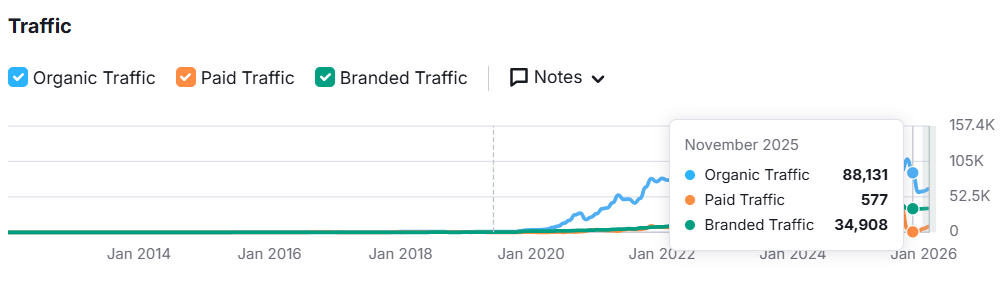
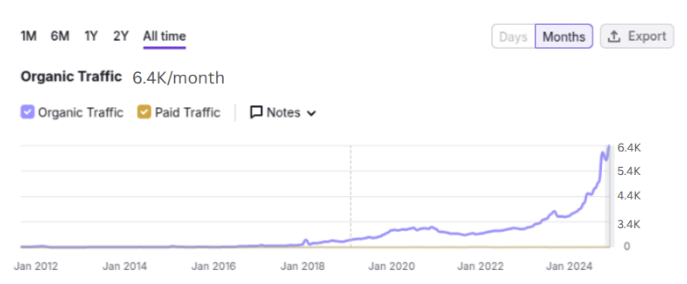
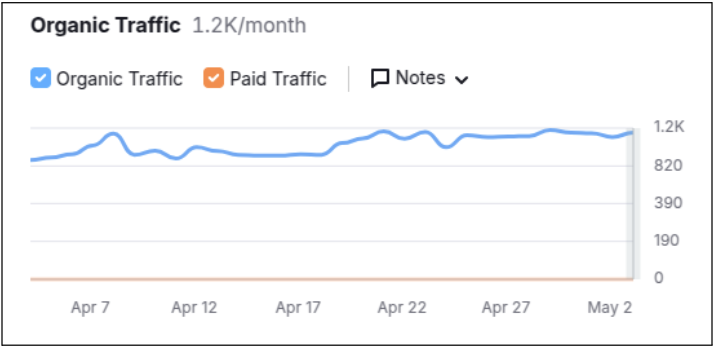
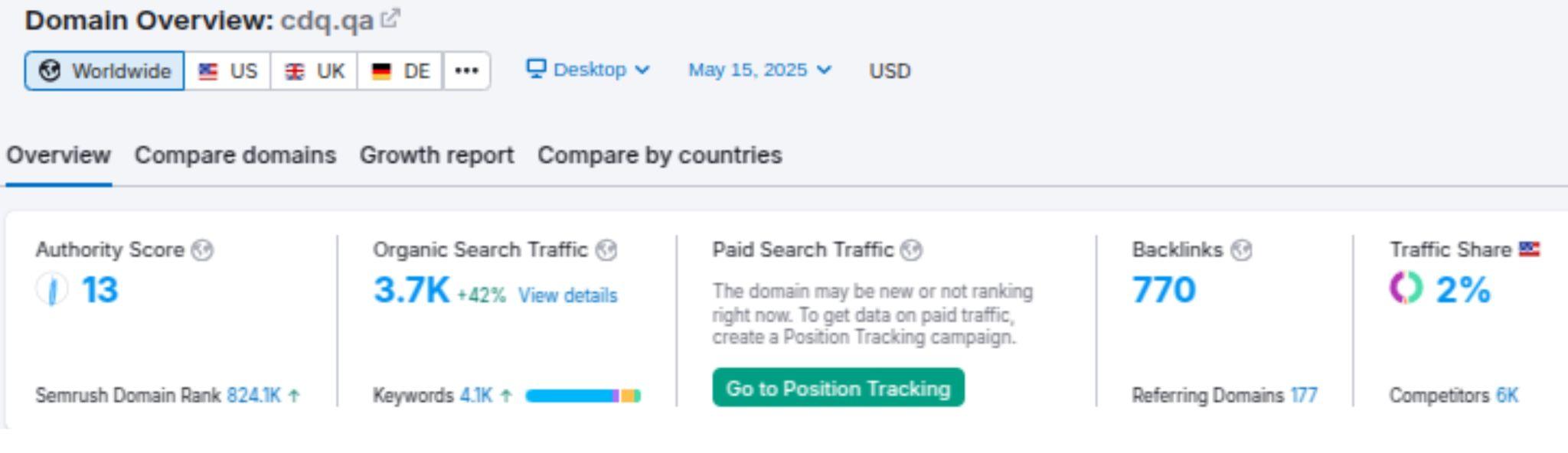
These figures come from four case studies in MayaWeb’s SEO library. They describe broader SEO campaigns; they do not establish what an audit alone achieved.
Education · India

Reported as per the Henry Harvin case study.
View traffic evidence for Henry HarvinRemovals · United Kingdom

Reported as per the SAL Removals case study.
View traffic evidence for SAL RemovalsHealthcare · United States

Reported as per the Ketamine Therapy case study.
View traffic evidence for Ketamine TherapyHome healthcare · Qatar

Reported as per the Clear Diamond Care case study.
View traffic evidence for Clear Diamond CareDiscuss your website
Send one important URL, the change you noticed and what a successful visit looks like: an order, a booking or a qualified enquiry. We’ll use that to agree coverage, timing and the handover.